
AnyPlant: AI Plant Identifier
Rydea GO.House & Home
3.70.00 Reviews
- Version
- 1.20.5
- Installs
- 100.00K
- Age Rating
- Everyone
Screenshots
Our Review of AnyPlant: AI Plant Identifier
 Analysis by Appyee
I approached AnyPlant: AI Plant Identifier as someone who often knows a plant looks familiar but cannot remember its name or care needs. It is a free House & Home app from Rydea GO., built around plant identification and conversation with a wider plant community. The basic appeal is easy to understand: take a closer look at a plant, use the app to help identify it, and then continue learning instead of stopping at a name.
That makes it more useful than a simple visual search tool in the right situation. I can imagine using it after bringing home an unfamiliar houseplant, while walking through a garden center, or when a plant suddenly develops yellow leaves. At the same time, I would not treat an AI result as a botanical verdict. Lighting, camera angle, damaged leaves, and similar-looking species can all affect recognition, so the app works best as a practical starting point rather than the final authority.
What the first-time experience feels like
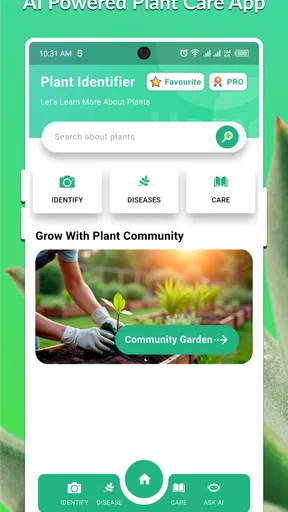
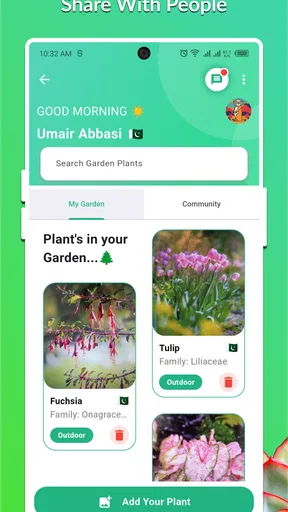
The app’s store short description is simply “AnyPlant,” while its fuller purpose is much clearer: identify plants with AI and connect that process to a global plant community. That combination gives it two different personalities. One part is a quick utility for answering “What plant is this?” The other is a more social learning space for people who want to discuss plants beyond a single identification.
For a first-time user, I would set expectations around speed and guidance rather than perfect certainty. A good scan should help narrow down the possibilities and give you a useful direction. It may be enough to recognize a familiar houseplant immediately, but a blurry image or a plant photographed from an unusual angle can make the result less dependable. I found that the quality of the input matters as much as the app itself.
The app is available at no upfront cost, which makes trying it straightforward. There are optional in-app purchases ranging from about eleven dollars to forty dollars per item, so I would pay attention to any upgrade screen before confirming anything. The free entry point is attractive for occasional identification, while frequent users should decide whether the extra paid functions genuinely fit their routine rather than subscribing or buying simply because the app is convenient.
Its audience rating is Everyone, which suits the simple household and gardening focus. The app has passed the early discovery stage too: it has more than one hundred thousand installs and an average rating of 3.7 from over five hundred ratings. I read that as moderate interest with room for different experiences, not as a guarantee that every plant or every device will produce the same result.
What I would prepare before opening it
My first practical tip is to photograph the plant before launching into a long diagnosis. I would choose a healthy-looking leaf, avoid harsh backlighting, and include enough of the plant to show its shape. If I were checking a problem leaf, I would take one image of the affected area and another of the whole plant. That gives the identification process more context and prevents me from confusing a damaged leaf with the plant’s normal appearance.
For a plant with distinctive flowers, I would capture both the flower and the leaves. For a foliage plant, I would prioritize the leaf pattern, edges, and arrangement. This is a small workflow change, but it is one of the most useful ways to improve an AI identifier: do not rely on a random snapshot taken from across the room.
Getting through the initial setup
After installing AnyPlant, I would keep the first session focused. The app is not something I need to understand all at once. I would begin with one plant that I can photograph clearly, complete the identification step, and only then explore the community side. That order makes the experience less confusing because I have a concrete result to react to instead of browsing without a purpose.
The current version is 1.20.5 and it supports devices running Android 7.0 or later. That broad compatibility is helpful if I am using an older Android phone for gardening tasks, although camera quality still matters more than the age of the operating system. A newer phone with a better lens may produce a more useful image than an older device with the same compatible software.
I would also avoid rushing through any introductory screens. If the app presents optional purchases or explains how its community works, I would read those screens rather than tapping through automatically. The free installation lowers the barrier to testing, but the listed purchase range is high enough that a first-time user should understand what is optional before continuing.
Another sensible setup habit is to decide what I want from the app. If I only need a name, I can treat the community as an optional second step. If I am trying to revive a struggling plant, I should collect several observations first: where it sits, how the leaves look, and whether the issue affects new or old growth. An identifier can help name the plant, but naming alone does not explain every care problem.
The first meaningful success
My definition of success would not be “the app recognized everything instantly.” It would be reaching a result that helps me take the next sensible action. For example, if I find an unlabeled plant at home, I can photograph it, review the suggested identity, compare the visible traits with the result, and then use the plant discussion area to ask a more focused question. That is a much better outcome than simply saving a name I may have misunderstood.
A realistic everyday scenario would be buying a small plant from a market where the label is missing or vague. At home, I would place it near a window, take a clear photo in daylight, and run the identification. If the result points toward a familiar type, I would use that as a research lead and record the visual details that support it. If the result seems wrong, I would retake the image with the camera closer to the leaves rather than immediately blaming the plant or the app.
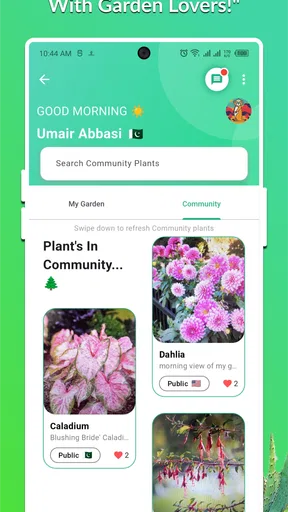
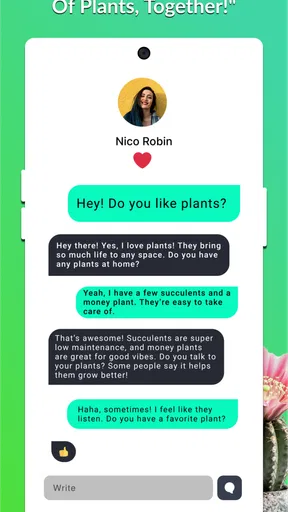
The community feature can become valuable at this point. Instead of asking, “What is this?” with one distant photo, I could ask, “Does this leaf shape match the suggested plant, and is the discoloration likely normal?” Specific questions are easier for other plant enthusiasts to understand and answer. This is one of the app’s less obvious strengths: identification can be the beginning of a better question, not the end of the process.
I would keep a simple personal record outside the app as well. Note the date of the photo, the plant’s location, and any visible change. That makes later conversations more useful because people can see whether the issue is stable or spreading. It also protects me from repeatedly asking the identifier the same question without learning from earlier attempts.
Where new users may get confused
The biggest likely confusion is treating an AI suggestion as a guaranteed species-level identification. Many plants share leaf shapes, colors, or growth habits. A result that looks convincing can still be a close relative or a broader plant group. I would compare the suggested name with the actual leaf arrangement, texture, markings, and overall growth pattern before making care decisions.
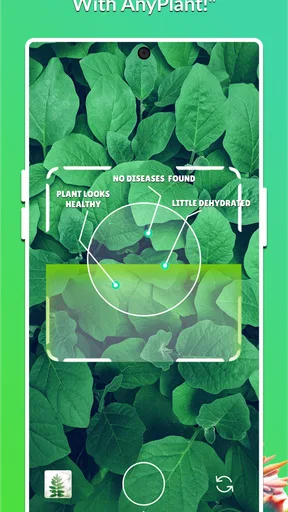
A second source of confusion is the difference between identifying a plant and diagnosing it. If the leaves are yellow, curled, spotted, or drooping, the app may help me understand what plant I am looking at, but that does not automatically establish the cause. Watering, light, pests, temperature, root condition, and recent movement can overlap in appearance. I would use the app to organize the investigation, not replace observation.
Photo quality deserves special attention. A single leaf covered in dust, partly hidden, or photographed under colored indoor lighting gives the system less to work with. I would wipe the camera lens, use natural light without direct glare, and take more than one view when the plant has unusual features. This is a simple, non-obvious improvement that can make the first attempt much less frustrating.
There is also a social expectation to manage. A global plant community can offer useful experience, but responses may vary in detail and confidence. I would look for explanations that match the visible evidence rather than choosing the most dramatic suggestion. If someone recommends a major change, such as moving a plant suddenly or altering its care sharply, I would make the change gradually where possible and watch how the plant responds.
The rating of 3.7 suggests that the experience is not universally smooth. I would interpret that as a reason to test the app with several ordinary plants before depending on it for a rare specimen or an urgent problem. If it handles the plants I already know reasonably well, I can judge whether its suggestions are useful for unfamiliar ones.
How it compares with familiar alternatives
The usual alternative is a general web search. Searching manually can be excellent when I already know a likely name, but it is slower when I only have a photograph and no vocabulary for what I am seeing. AnyPlant’s advantage is the shorter path from image to discussion. Instead of guessing search terms, I can begin with the plant itself.
Another alternative is asking a local nursery or a gardening group. Human advice can be more nuanced, especially when the question involves regional growing conditions or a serious plant problem. However, those options are not always available when I am standing in a store or looking at a plant late in the evening. AnyPlant is more convenient for the first pass, while a knowledgeable person may be better for confirmation and difficult care decisions.
Traditional reference books and plant websites remain stronger for structured, carefully edited information. I prefer them when I want to study a species in depth or compare long-term care requirements. The app is more immediate and interactive, but that convenience comes with the need to evaluate results thoughtfully. In practice, I would use AnyPlant for discovery, then consult a trusted reference when the decision involves an expensive plant or a significant change in care.
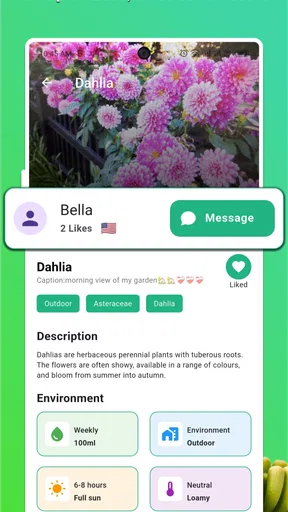
The community angle separates it from a basic camera search. If I only want a quick label and never plan to ask questions, a simpler identifier may be enough. If I enjoy showing a plant, comparing experiences, and learning from other growers, the social layer gives AnyPlant a stronger reason to stay installed.
Who will get the most from it
I think the app suits beginners who have started collecting houseplants but still struggle with names. It is also useful for renters, students, and busy households where plants arrive without clear labels. The free starting point makes experimentation less intimidating, and the Everyone rating means it is presented as a broadly accessible home-and-garden tool.
It may also help experienced growers when they encounter an unfamiliar ornamental plant. Even someone who knows a lot about plants can use a quick identification prompt to generate possibilities before checking more authoritative material. The community can add practical observations that formal descriptions do not always emphasize, such as how a plant looks when stressed or how similar varieties are commonly confused.
I would skip it if I need legally or scientifically precise identification, if I am dealing with a toxic plant around children or pets, or if a wrong result could create a serious risk. In those cases, I would seek confirmation from a qualified local source. I would also skip the paid route unless I had used the free experience enough to know exactly what problem the purchase solves. The app’s convenience is valuable, but it should not override careful judgment.
My recommended routine after the first scan
Once I have a plausible identification, I would save the useful details in a personal plant note: the suggested name, the photo, the room, and the question I still need answered. Then I would return to the app only when I have a specific purpose, such as checking a new plant, comparing a leaf change, or asking the community for a second opinion. This keeps the app practical instead of turning it into another feed I open without a clear goal.
For uncertain results, I would repeat the scan under better conditions and use a different part of the plant. If both attempts point in the same direction, confidence increases, but I would still verify important care or safety information elsewhere. If the results differ, that is useful information too: it tells me the image is ambiguous and that I should not make a strong decision based on one answer.
I would be especially careful with watering advice. Identification can suggest what kind of plant I have, but a fixed schedule rarely fits every home. Light, pot size, soil, season, and airflow all matter. My preferred approach would be to use AnyPlant to identify the plant, inspect the soil and leaves myself, and then adjust care gradually while watching for improvement.
Rydea GO. has positioned this app between a visual utility and a plant conversation space. That is a sensible direction, because plant owners usually want more than a label. Still, the app’s value depends on how thoughtfully I use the result. The strongest workflow is identify, inspect, ask a focused question, and verify before acting.
Overall, I would recommend AnyPlant to a first-time plant owner who wants an approachable way to recognize unfamiliar plants and begin asking better questions. I like the low-risk starting point, the connection between identification and community discussion, and the fact that it can fit naturally into an everyday plant-care routine. I would not present it as a replacement for expert advice or dependable reference material, and I would approach the optional purchases carefully. Used as a helpful first step rather than an unquestionable authority, AnyPlant: AI Plant Identifier is a practical companion for exploring the plants already growing around you.
Verdict
Strengths of AnyPlant: AI Plant Identifier
- Identifies many common houseplants from a single photo.
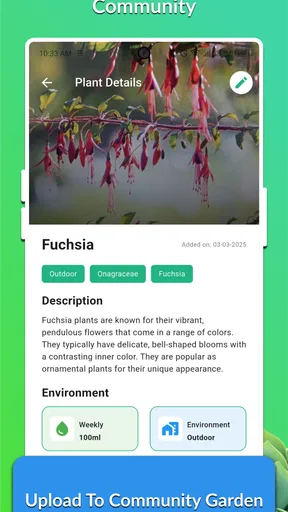
- Offers practical care guidance for watering, light, and soil.
- Useful for beginners learning plant names and basic maintenance.
- Simple interface makes scanning plants quick and accessible.
- Can help spot possible health issues before they become severe.
Limitations of AnyPlant: AI Plant Identifier
- Results may be unreliable with poor lighting or unclear plant photos.
- Some advanced identification and care tools may require a subscription.
- Care advice may not account for your exact climate or indoor conditions.
- Rare species can be misidentified or receive limited information.
- Regular photo scanning may use mobile data and drain battery.
Similar Picks in This Category
View All
Universal TV Remote Control
CodeMatics Media Solutions3.9

AlfredCamera Home Security app
Alfred Systems Inc.4.7

Planner 5D: AI Home Design
Planner 5D4.5

Universal Tv Remote-Cast to TV
One Music Player4.1

Zillow: Homes for Sale & Rent
Zillow Group4.8

99acres Buy/Rent/Sell Property
infoedge.com4.3
Frequently Asked Questions
What is AnyPlant: AI Plant Identifier and how does it work?
AnyPlant: AI Plant Identifier is a mobile app designed to recognize plants from photos. After taking a picture or selecting one from your gallery, the app analyzes visible features such as leaves, flowers, stems, and overall shape, then suggests a likely plant name and related information. Results are intended as helpful guidance, not as a guaranteed botanical identification.
How accurate is AnyPlant when identifying plants?
The app can provide useful results for clear, well-lit photos of recognizable plants, but its accuracy may vary considerably. Blurry images, unusual varieties, damaged leaves, young plants, or similar-looking species can lead to incorrect suggestions. It is best to photograph several parts of the plant and compare the result with trusted botanical sources, especially before making decisions about treatment or toxicity.
Can AnyPlant identify indoor plants, flowers, trees, and weeds?
AnyPlant is generally useful for a broad range of plant types, including common houseplants, garden flowers, trees, shrubs, and some weeds. However, coverage and confidence may differ depending on the species and the quality of the image. Closely related plants can be difficult to distinguish, so the app should be treated as an identification aid rather than a complete field guide for every regional or rare species.
Does AnyPlant provide plant care advice after identification?
Depending on the plant and the app’s available information, AnyPlant may display care-related details such as watering, sunlight, soil, or general maintenance suggestions. These recommendations should be viewed as a starting point because care requirements can change with climate, season, pot size, humidity, and the plant’s condition. Always consider local growing conditions and observe how your plant responds.
Is AnyPlant free to download, and does it require internet access?
AnyPlant may be available to download at no initial cost, but some identification tools, detailed information, or additional features can depend on the app’s current subscription or in-app purchase structure. Photo analysis may also require an internet connection if images are processed online. Before downloading, check the official Google Play or App Store listing for the latest pricing, permissions, supported devices, and privacy details.
